

- Why Google Business Profile Is Now Your Front Line of Defense
Ten years ago, your website was the center of your local presence. Today, for many local businesses, Google Business Profile is the homepage:
- It’s often the first thing people see when they search your brand or local keywords.
- It controls how you appear on Google Maps, local 3-pack, and mobile searches.
- It’s where reviews, photos, Q&A, posts, and attributes live—everything that shapes trust at a glance.
When something goes wrong here—fake reviews, malicious edits, bugs, suspensions—you don’t just lose rankings. You lose phone calls, foot traffic, and real revenue.
1.1 The new threat landscape for local brands
Your GBP faces constant risks:
- Spam & fake listings: Competitors or spammers create misleading profiles to siphon traffic.
- Malicious edits: Anyone can suggest changes to your hours, category, or phone number. If you’re not watching, Google may publish them.
- Review attacks: Coordinated 1-star review bombs from bots or angry individuals.
- Policy changes: Google quietly tweaks verification, categories, or suspension rules. If you’re not up to date, you can get caught out.
Real impact example:
Imagine a multi-location dental brand:
- Friday night: a disgruntled ex-employee leaves 10 fake 1-star reviews across locations.
- Saturday–Sunday: no one checks profiles. Average rating drops from 4.7 to 3.9.
- Monday: call volume is down 20%, and new patient bookings are off for the week.
This is exactly where monitoring and defense strategies matter.
- What Do We Mean by “Automated GBP Monitoring” vs. “Manual Defense”?
Before comparing, let’s define each clearly.
2.1 Automated GBP monitoring tools
Automated GBP tools connect to your GBP via API or data connectors and then:
- Continuously pull data: reviews, Q&A, profile edits, listing status, rankings, and insights.
- Trigger alerts: email, SMS, Slack, or in-app notifications when something changes.
- Provide dashboards to track performance, sentiment, keyword rankings, and profile health.
- Sometimes offer AI assistance for review responses or anomaly detection.
Common categories of automated tools:
- Review monitoring platforms – aggregate reviews from Google and other sites, alert you instantly, and help you respond at scale.
- Local SEO / rank tracking platforms – track local pack rankings, visibility, and competitors by geo-grid or ZIP.
- GBP management platforms – central dashboards for multiple locations: edits, posts, attributes, photos, and insights.
- Reputation & crisis tools – flag sudden rating drops, spam patterns, and potential crises early.
Think of them as 24/7 security cameras + analytics for your GBP ecosystem.
2.2 Manual GBP defense
Manual defense is the human side:
- Logging into Google Search / Maps and manually checking profiles.
- Spot-checking reviews, Q&A, photos, and attributes.
- Responding to each review or complaint individually.NetReputation+1
- Filing appeals or reports to Google when issues arise (fake reviews, suspensions, duplicates).SoftTrix
- Updating information, posting content, and auditing consistency across locations.
Manual defense is where judgment, empathy, and context live. A tool can’t decide:
- How to de-escalate an angry customer.
- Whether a review is legally risky.
- How aggressive you should be in reporting a competitor’s spam listing.
You need both sides—but the mix depends on your business size, risk profile, and resources.
- The Core Jobs of GBP Monitoring & Defense
To compare tools vs. manual, we need to outline the jobs to be done. At a minimum, every local business should cover these:
- Real-time change detection
- Review & rating management
- Profile integrity & policy compliance
- Visibility & ranking monitoring
- Crisis detection and response
We’ll unpack each and compare automation vs. manual effort.
- Real-Time Change Detection
4.1 What can go wrong?
- Your main phone number gets changed to a competitor’s or a call-center scam.
- Hours are updated incorrectly (e.g., “Closed on Saturdays” gets added).
- Primary category changes from “Plumber” to “Hardware store,” killing relevant visibility.
Google allows third parties to suggest edits, and some are auto-applied if the system “trusts” them. That’s risky if you’re not watching.
4.2 How automated tools handle change detection
A good GBP monitoring tool will:
- Pull your profile data on a schedule (e.g., hourly or daily).
- Compare each new snapshot to the previous one.
- Flag changes: category, name, phone, website, address, hours, attributes, and business status (e.g., “Permanently closed”).
- Send alerts via email, SMS, Slack, or a dashboard.
Strengths:
- Speed – detects changes quickly, often before customers start complaining.
- Coverage – can monitor dozens or hundreds of locations with the same rigor.
- Audit trails – logs what changed, when, and on which profile.
Weaknesses:
- Tools detect changes, but they can’t judge intent. Was it a harmless tweak or a malicious act?
- They may miss edge cases if Google’s API doesn’t expose a particular field or status change immediately.
4.3 How manual defense handles change detection
Manual monitoring usually looks like:
- “My Business” or brand-name searches in Google to see the Knowledge Panel view.
- Periodic checks of your profile from different devices / locations.
- Relying on customers: “Hey, your hours are wrong,” in a call or DM.
Strengths:
- You see the profile exactly as users see it.
- You may notice visual issues (photo order, misleading images, layout changes) that tools ignore.
- Good for small businesses with a single location if they’re disciplined.
Weaknesses:
- Easy to forget or deprioritize.
- No structured log of changes—hard to investigate patterns or prove tampering.
- Not scalable beyond 1–3 locations.
- Review & Rating Management
Reviews are both your biggest opportunity and your biggest vulnerability. They influence:
- Local rankings (recency, volume, rating, and responses).
- Conversion rate (clicks → calls → visits).
- Brand trust and perceived quality.
5.1 Automated review monitoring & response
Most GBP/reputation tools can:
- Pull in all new reviews in near real-time.
- Send alerts to the right person or team.
- Tag reviews (e.g., “Service,” “Price,” “Staff,” “Location”) using NLP.
- Aggregate sentiment over time.
- Provide AI-suggested responses that can be approved or edited by humans.
Benefits:
- No review goes unseen – critical for early crisis detection.
- Major time savings for franchises and agencies.
- Better insights into themes: “Wait time” complaints rising? “Friendly staff” praised?
Risks & limitations:
- AI replies may feel generic if not customized.
- There’s a risk of tone-deaf responses if humans don’t review them—especially in sensitive industries (medical, legal, finance).
- Tools can’t fully judge whether a review violates Google’s policies—that’s still human and legal work.
5.2 Manual review response & removal
Humans do the heavy lifting for:
- Crafting nuanced replies that show empathy and address specifics.
- Escalating serious complaints internally (e.g., safety, legal, discrimination).
- Reporting and appealing clearly fake or policy-violating reviews through Google.
- Coordinating with legal/compliance teams in regulated verticals.
Strengths:
- Higher-quality, on-brand responses.
- Ability to de-escalate conflict and sometimes turn critics into promoters.
- Strategic decisions: Which battles to fight, when to request removal, when to own the mistake.
Weaknesses:
- Time-consuming, especially at scale.
- Easy to respond only to “easy” reviews and procrastinate on tough ones.
- Without structure, response times become inconsistent.
- If review appears fake / violates policy → document evidence (screenshots, CRM logs) → submit removal request to Google → follow up via support if needed.
Underneath, list SLA examples:
- “Respond to all reviews within 24 hours.”
- “Escalate critical reviews within 4 hours during business days.”
- Profile Integrity & Policy Compliance
GBP suspensions or soft actions can decimate your visibility overnight.
6.1 Common profile risks
- Using prohibited keyword-stuffed business names (“Best Emergency Dentist – City Name 24/7”).
- Incorrect or misleading categories and attributes.
- Multiple listings at the same address or virtual offices when not allowed.
- Violating content rules with posts or photos.
6.2 How automation helps here
Sophisticated tools can:
- Scan your profiles for inconsistent NAP (name, address, phone) across locations and listings.
- Flag suspicious naming patterns or addresses.
- Monitor for sudden drops in impressions, calls, or direction requests that might indicate a soft suspension or algorithmic demotion.
Example dashboard widget:
- “Listings at risk”:
- 3 profiles flagged for keyword stuffing.
- 2 profiles with duplicate addresses.
- 1 profile with suspicious recent name change.
6.3 Where manual defense is critical
Only humans can:
- Interpret Google’s often vague guidelines in context.
- Decide whether to push the envelope on optimization (e.g., adding key service terms) or stay ultra-safe.
- Prepare reinstatement appeals if your listing gets suspended—gathering licenses, utility bills, storefront photos, etc.
You want tools to flag risk and humans to manage the relationship with Google.
- Visibility & Ranking Monitoring
Monitoring GBP is not just about defense—it’s about offense.
7.1 Why ranking tracking is different for local
Local rankings are geo-dependent: a user 500 meters away may see a different 3-pack than a user in your store.
Local SEO tools now:
- Use geo-grid rank tracking: multiple points across a map measuring where you rank for specific keywords.
- Combine GBP insights (views, calls, directions) with ranking movements.
- Monitor competitors’ profiles for categories, reviews, and photos.
7.2 How automation drives proactive strategy
Automated reports can:
- Show that when you cross 100+ reviews with 4.5★+, your local pack visibility jumps.
- Reveal that posting weekly correlates with higher engagement and click-through.
- Highlight that a competitor recently changed category or started posting daily—coinciding with your drop.
This turns monitoring into strategic decision support, not just alert fatigue.
7.3 Manual analysis & decision-making
Humans interpret the data:
- Decide which keywords matter most by revenue, not just volume.
- Understand seasonality (e.g., tax accountants peak vs. home services peak).
- Align local SEO moves with offline marketing and promotions.
- Crisis Detection & Response
The difference between a minor incident and a full-blown reputation crisis is usually response time.
8.1 Early-warning signals tools can catch
Automated tools can monitor for:
- Review velocity spikes: 15 negative reviews in a day vs. usual 1–2/week.
- Sudden rating drop: from 4.6 to 3.9 in 48 hours.
- Traffic anomalies: impressions or calls drop 40% overnight.
- Profile status changes: business temporarily suspended, marked “Closed,” or address flagged.
When configured right, you get real-time crisis alerts, not a surprise at the end of the month.
8.2 The human crisis playbook
Once a potential crisis is identified, manual defense takes over:
- Assess severity
- Check the content of new reviews.
- Look for patterns: same wording, same issue, coordinated attack?
- Align stakeholders
- Inform management, PR, legal, and operations.
- Decide key messages and what can be admitted/denied.
- Act on GBP immediately
- Respond to priority reviews compassionately and professionally.
- Pin a post if needed to clarify a temporary issue (e.g., “We are currently closed due to flooding and will reopen on…”).
- If reviews violate policies, submit removal requests with documentation.
- Monitor aftershocks
- Continue monitoring review volume and sentiment daily until things normalize.
- Adjust operations (staff training, processes) to prevent recurrence.
- Cost–Benefit Analysis: Tools vs. Manual
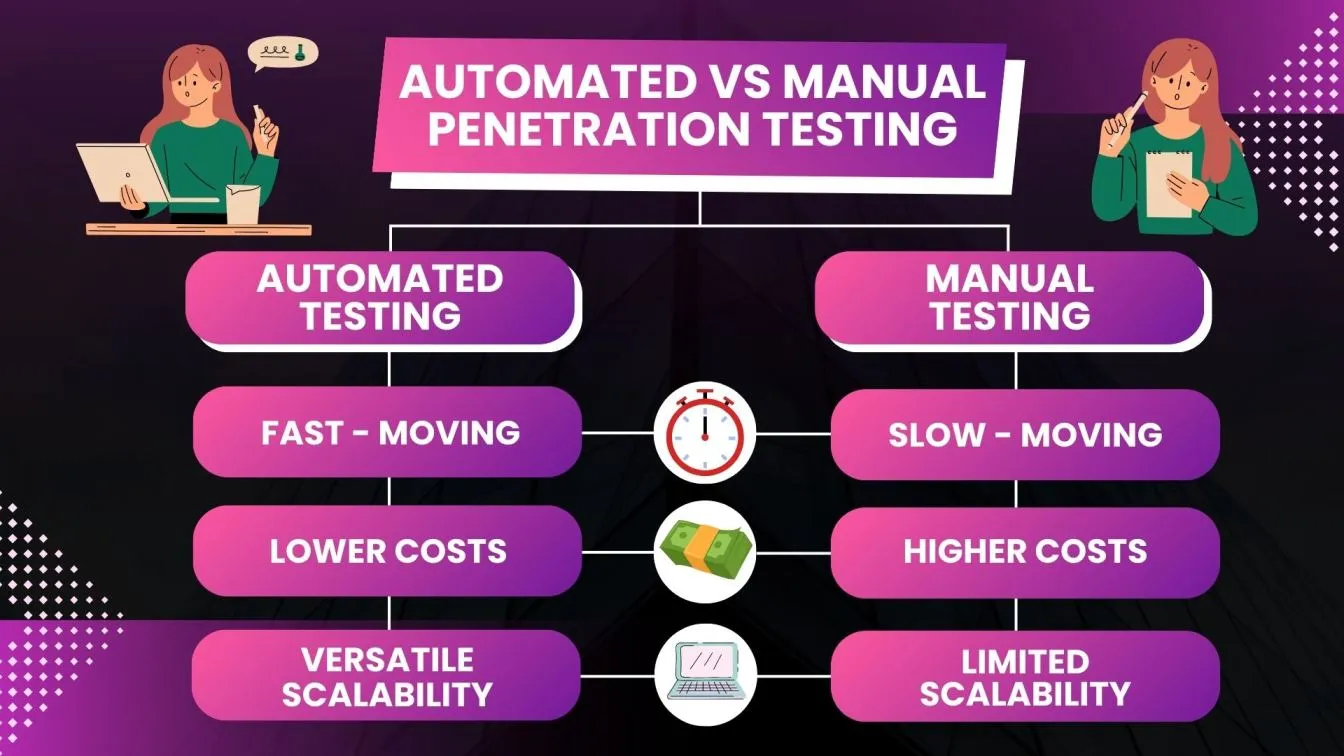
Let’s compare automation vs. manual along four axes: speed, scale, quality, and cost.
9.1 Speed
- Automation: Near real-time detection and templated responses.
- Manual: Limited by human bandwidth and working hours.
If your reputation risk is high (e.g., healthcare, legal, home services), speed alone justifies using tools.
9.2 Scale
- One person can manually watch one or a few profiles seriously.
- A tool can monitor hundreds of profiles with the same intensity—if you have defined workflows.
For multi-location brands and agencies, automation isn’t optional; it’s infrastructure.
9.3 Quality
- Automation produces consistent but generic quality.
- Humans produce higher empathy and nuance, but quality varies by training.
Best practice: automate detection & drafting; require human approval for responses in sensitive contexts.
9.4 Cost
Hypothetical comparison (for content illustration):
| Setup | Monthly Tool Cost | Internal Time / Month | Risk Level |
| Manual-only, 1 location | $0 | ~4–6 hrs | Medium |
| Manual-only, 10 locations | $0 | 30–40+ hrs | High (things slip) |
| Automation + manual, 10 | $150–$400 | 10–15 hrs | Lower, more stable |
| Automation + manual, 50 | $300–$800 | 20–30 hrs | Much lower |
You can refine these estimates to match your niche and payroll reality.
- When Manual Defense Alone Is Enough (and When It Isn’t)
10.1 Local businesses that can survive (for now) with manual defense
Manual-only can work when:
- You have one physical location.
- You’re in a low-drama industry (e.g., gift shop, yoga studio) with modest review volume.
- You—or a small team—are disciplined and check GBP daily.
- You’re not facing intense local spam/competition right now.
Even in this case, you should:
- Set a daily GBP check routine (10–15 minutes).
- Maintain a simple review response template bank.
- Run a monthly profile audit (categories, attributes, photos, posts).
10.2 When automation becomes non-negotiable
You absolutely need tools when:
- You manage multiple locations (3+).
- You’re in reputation-sensitive industries: healthcare, law, finance, home services, education.
- You’ve experienced review spam or attacks even once.
- You’re an agency handling clients’ GBPs and must prove response times and visibility improvements.
Here, manual-only is like running enterprise IT without antivirus or backups—possible, but reckless.
- Building a Hybrid GBP Defense System (Recommended Model)
The highest-performing local brands use a hybrid model:
Automation for detection & data → Humans for strategy & resolution.
Here’s a practical blueprint.
11.1 Step 1 – Define your GBP “Defense SLAs”
Decide what “good” looks like:
- Reviews:
- “Respond to all reviews within 24 hours; 1★ reviews within 4 hours on business days.”
- Changes:
- “Investigate any business name/phone/category/hour changes within 12 hours.”
- Crises:
- “Escalate rating drop >0.3 points over 48 hours to leadership.”
Write these into a simple one-page GBP Defense Policy.
11.2 Step 2 – Choose the right automation stack
You don’t need 10 tools; you need one or two that integrate well.
Look for:
- API access to GBP for reliable data.
- Multi-location support.
- Review monitoring + basic sentiment analysis.
- Alerting via email/Slack and simple role-based permissions.
- Dashboards you can easily export for leadership or clients.
If you already use a broader reputation or marketing analytics platform, check if it has GBP modules or connectors so you’re not duplicating efforts.
11.3 Step 3 – Map roles in your defense workflow
Identify who does what:
- Local managers – first-line responders to everyday reviews and Q&A.
- Marketing / SEO team – owns visibility strategy, posts, category optimization.
- Operations / customer experience – fixes service issues behind negative reviews.
- Legal / compliance – handles high-risk reviews or content.
- Agency partners (if any) – execute monitoring and reporting, escalate only what needs internal attention.
Document this in a simple RACI chart (Responsible, Accountable, Consulted, Informed).
11.4 Step 4 – Implement daily, weekly, and monthly routines
Daily:
- Check review alerts; respond or triage.
- Scan any profile change alerts.
- Check for crisis signals (sudden rating drops, suspicious clusters).
Weekly:
- Review top review themes and address quick wins.
- Publish new Google Posts or update photos.
- Spot-check 3–5 profiles manually (desktop & mobile).
Monthly:
- Run a GBP Health Report:
- Review counts, average rating, response time.
- Visibility trends (impressions, calls, directions).
- Audit categories, attributes, URLs, and UTMs.
- Identify 2–3 tests: new photos, post formats, Q&A seeding, etc.
11.5 Step 5 – Close the loop between data & real-world change
Monitoring is useless if it doesn’t drive action.
Examples:
- If review sentiment shows “wait time” is your biggest issue, adjust scheduling and staffing, not just your replies.
- If geo-grid rankings are weak in certain neighborhoods, launch localized campaigns or generate more local reviews in those areas.
- If a particular location consistently underperforms on calls and directions, investigate staff training, signage, or even safety concerns.
Document one operational improvement per month derived from GBP data.
- Example GBP Defense Workflows by Business Type
To make this more concrete, let’s walk through 3 scenarios.
12.1 Single-location restaurant
Profile:
- 1 busy city location
- 200+ reviews, 10–20 new/month
Minimal hybrid setup:
- Tool: Basic review monitoring + alerting, simple dashboards.
- Owner or manager checks alerts daily, responds to all reviews personally.
- Weekly: upload new food and ambiance photos, publish a Google Post about specials.
Defense benefit:
- Quickly catch fake or malicious reviews (e.g., competitors) and report them.
- Spot trend: “Service is slow on weekends” → increase staff for peak hours.
12.2 Multi-location home services (plumbing, HVAC, etc.)
Profile:
- 10–30 locations across a metro area
- High review volume; high trust requirement
Hybrid setup:
- Tool: Full GBP + review + rank tracking suite with geo-grid maps.
- Central marketing team oversees automation; local managers handle responses.
- SLA: 100% of reviews answered within 24 hours; 1★ within 4 hours.
- Monthly: consolidated report showing which locations need coaching.
Defense benefit:
- Early detection of review attacks or pattern issues (e.g., one technician causing multiple complaints).
- Visibility optimization: identify which neighborhoods underperform and push for more reviews and posts there.
12.3 Healthcare clinic network
Profile:
- 5 clinics, strict regulatory environment
- Sensitive reviews: medical outcomes, staff behavior, privacy concerns
Hybrid setup:
- Tool: GBP + reputation monitoring integrated into patient experience system.
- Dedicated compliance officer reviews AI-suggested responses before publishing.
- Escalation path for any review mentioning safety, discrimination, or malpractice.
Defense benefit:
- Protects patient trust and reduces legal risk.
- Turns GBP data into patient-experience improvements rather than just PR spin.
- Actionable Checklist: Upgrading Your GBP Defense This Month
Here’s a practical, copy-paste checklist to implement over the next 30 days.
Week 1: Audit & Baseline
- Export all GBP locations, categories, hours, and phone numbers into a spreadsheet.
- Check for obvious inconsistencies or violations (keyword stuffing, wrong categories).
- Pull current review count, average rating, and response rate for each location.
- Identify top 5 competitors in your area and quickly review their profiles.
Week 2: Implement Monitoring
- Select a GBP monitoring tool or ensure your current platform properly tracks:
- Reviews
- Profile changes
- Performance insights
- Set up alerts to go to the right people (not just a generic inbox).
- Configure simple tags for reviews (e.g., service, price, staff, facility).
Week 3: Build Workflows
- Write 10–15 review response templates (positive, neutral, and negative).
- Define triage rules: which keywords in reviews trigger escalation (e.g., “unsafe,” “fraud,” “illegal”).
- Draft your GBP Defense SLAs with clear response times.
- Document who handles:
- Everyday reviews
- Suspicious/fake reviews
- Suspensions and appeals
Week 4: Optimize & Iterate
- Create a simple weekly GBP report for leadership or clients.
- Plan two tests for next month:
- New photo strategy
- Weekly vs. bi-weekly posts
- Schedule a monthly GBP review meeting to discuss trends and actions.
- Train at least one backup person in the defense workflows.
- So… What Works Best: Automated Tools or Manual Defense?
If you’ve read this far, you know the honest answer:
The strongest local businesses use automated GBP monitoring to magnify the power of their manual defense—not replace it.
- Automation without humans = fast, blind, and sometimes tone-deaf.
- Humans without automation = thoughtful, but slow and error-prone at scale.
For most local businesses today, especially those with reputation risk or multiple locations, the question isn’t whether to use automated monitoring—it’s:
- Which tools best fit our stack and budget?
- How do we design workflows so that humans always make the final call?
- How do we turn GBP data into real operational improvements?
If you get those answers right, your Google Business Profile becomes more than a listing:
It becomes a real-time defense shield, a growth engine, and one of the most powerful levers you have to outrank and out-reputation your local competitors.