






Introduction
In today’s local-search driven marketplace, your presence in Google Business Profile (GBP) is often the first impression a customer gets of your business. Yet many business owners overlook one of the most powerful but under-leveraged elements of GBP: the category selection. Choosing the right primary and secondary categories can directly influence which searches your business shows up for, how many views you get, and ultimately how many customers you attract.
In this blog we’ll explore:
- What primary vs. secondary categories are (and why the distinction matters)
- How category selection influences traffic, visibility and conversions
- How to choose the right primary category for your business
- How and when to use secondary categories effectively
- Mistakes to avoid and optimization strategies to boost traffic
- A practical step-by-step workflow, case studies, and measurable metrics
By the end of the article, you’ll have a deep understanding of “what you are” (primary category) vs. “what you do” (secondary categories) and how to use this distinction to get more traffic from your GBP.
- What Are GBP Categories & Why They Matter
Before digging into primary vs. secondary, let’s set the foundation.
1.1 Definition & Scope
The Google Business Profile categories are predefined labels (from Google’s official list) that classify your business in terms of what it is. They help Google decide which kinds of searches your profile is relevant for, and they help customers in search and maps understand what you do.
You can select:
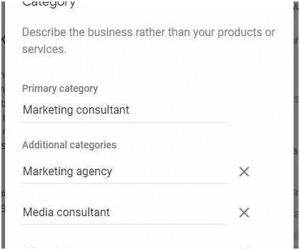
- One primary category
- Up to nine additional (secondary) categories (so a total maximum of ten) according to Google.
1.2 Why They Are Important for Traffic & SEO
Category selection is much more than a formality:
- The primary category is considered one of the strongest signals in local SEO / Google Maps ranking.
- The categories impact which search queries trigger your profile (i.e., relevance). For example: if your primary category is “Pizza restaurant”, Google may show you for “Italian restaurant”, “restaurants near me”, or “pizza near me”. Google Help+1
- Secondary categories help you capture additional niches, tailored searches, or specialties. They add context beyond your core category.
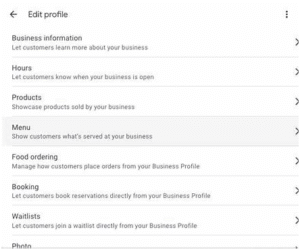
- Categories also unlock certain GBP features (for example: restaurants may show menu links, retail stores may show product inventory). So picking the correct category can change user behavior and conversion potential.
By optimizing category selection, you’re effectively telling Google: “Here’s exactly what kind of business we are, and here are our specialties”. That clarity helps you show up in more relevant searches, which means more traffic to your listing, website, calls, or store visits.
- Primary vs. Secondary: Understanding the Difference
Let’s zero-in on what makes primary and secondary categories different, and why each has distinct importance.
2.1 Primary category = Your business’s headline
Think of the primary category as your business’s identity card. It’s what you are, not what you do. For example:
- If you’re a dental practice specializing in children, your primary category might be “Pediatric Dentist” rather than just “Dentist”.
- If you run a steakhouse, your primary category might be “Steak House” rather than “Restaurant”.
Choosing the most specific category that accurately describes your core business is key. The primary category carries the most weight in ranking.
2.2 Secondary categories = your supporting services/niches
Secondary categories are additional labels that reflect other significant services or specialties you offer — the things you also are good at, but not necessarily your main identity. They add breadth and nuance. For example:
- A pediatric dentist might add “Dentist”, “Children’s Orthodontist”, “Dental Clinic” as secondary categories.
- A landscaping business may have “Landscaper” as primary, and “Tree Service”, “Lawn Care Service”, “Irrigation System Supplier” as secondary.
But note: secondary categories don’t carry as much ranking weight as the primary. They are more about adding relevance for multiple search intents than being the lead category.
2.3 Summary table: Primary vs Secondary
| Feature | Primary Category | Secondary Categories |
| How many? | Exactly 1 | Up to 9 additional (max total categories 10) Google Help+1 |
| Core purpose | Represents your business identity (“This business IS a…”) | Adds detail/context (“This business ALSO does…/specializes in…”) |
| Ranking weight | Highest signal for relevance & visibility | Moderate signal — supports niche queries |
| Best practice | Choose the most specific accurate category that covers the bulk of your business | Choose relevant specialties / services you actually provide |
| Common mistake | Choosing a too generic or incorrect category (e.g., “Restaurant” when you are “Sushi Restaurant”) | Adding every possible keyword category dilutes focus |
2.4 Why the distinction matters for traffic
If your primary category is off (too broad or inaccurate), you might be invisible in the searches you want. Conversely, if you don’t use secondary categories, you may miss out on additional relevant search intents.
For example: Suppose you are a bridal boutique that also offers alterations and accessories. If your primary is “Clothing Store”, you may appear for generic clothing queries but not “Bridal gown boutique near me”. If you make your primary “Bridal Gown Store” and secondary “Wedding Dress Alterations”, “Bridal Accessories Store”, you capture both broad and niche traffic.
Also: using too many irrelevant secondary categories can confuse Google, reduce clarity, and hamper your local relevance. The right balance is crucial.
- How Category Choice Impacts Traffic & Visibility
Now that we’ve defined primary vs. secondary, let’s dig into how category selection drives traffic. We’ll look at mechanisms, data points, examples, and flows.
3.1 Mechanism: How Google uses categories
- Initial classification – When Google crawls and indexes your business, the primary category tells the algorithm: “This business is a X”. That becomes the anchor for relevance.
- Matching search queries – When users search on Google or Maps, Google checks which businesses are relevant based on the category + other signals (reviews, proximity, citations). If your category aligns with the query intent, you’re more likely to show up. Google Help
- Additional context via secondaries – Secondary categories help cover related intents. For example, a plumbing company might also appear for “Drain cleaning” or “Emergency plumber” if it has those categories.
- Feature unlocks and UI behavior – Depending on your category, your listing might show different features (e.g., booking button, menu link, product catalog). These can improve user engagement and conversion, which leads to more traffic from those users.
3.2 Data & case logic
- As of 2025, there are more than 4,000 official categories in Google’s list.
- Google explicitly states: “Selecting a primary category that best describes your business helps Google match your business to relevant searches.” Google Help
- SEO practitioners recommend: While you can use up to nine secondaries, most businesses get diminishing returns after 4–7. Aggressively using the full nine may dilute your focus.
3.3 Example flows
Flow A – Good category selection:
- Primary: “Commercial Painter”
- Secondary: “Interior Painting Contractor”, “Exterior Painting Contractor”, “Cabinet Refinisher”
→ Your GBP shows up for “commercial painter near me”, “interior painting contractor Detroit”, “cabinet refinisher Detroit”.
→ Result: More traffic from different relevant queries.
Flow B – Poor category selection:
- Primary: “Contractor”
- Secondary: “Painter”, “Handyman”, “Decorative Services”
→ Too generic: you compete with broad “contractor” listings, ranking weaker.
→ The “Painter” secondary might help, but being secondary it will get less weight. You miss the signal strength of a focused primary.
→ Result: Less targeted traffic, weaker visibility.
3.4 Traffic boost tactics via categories
- Use a specific primary category (not generic) to improve ranking in your niche.
- Use relevant secondary categories that reflect actual services you offer.
- Audit your categories periodically — business services evolve, competitor landscape shifts, Google adds new categories.
- Use the categories to align service pages on your website: e.g., if you add “Cabinet Refinisher” as a secondary category, ensure you have a dedicated webpage for that service. This reinforces topical relevance.
- Analyze your GBP Insights (discovery searches, queries, clicks) and see which keywords and categories are driving traffic — then refine accordingly.
- How to Choose the Right Primary Category
Selecting the right primary category is critical. Below is a structured approach.
4.1 Step-by-step process
Step 1: Define your core business service
Ask: What is the main thing we do, that drives most of our revenue, or that we want to be known for?
Step 2: Use customer perspective
Ask: If a new customer were to search for someone like us, what would they type? What term would they use?
Step 3: Compare competitor primary categories
Look at the top-ranked businesses in your local area for your niche. What primary category are they using? Tools or manual search can reveal this.
Step 4: Find the most specific category in Google’s list
Don’t pick a broad category if a more specific one exists. For example, select “Sushi Restaurant” instead of “Restaurant” if that fits better. Google Help
Step 5: Consider future business direction
If your business will expand to additional services, you might anticipate that—but pick a primary category that still aligns with your core now. Secondary categories can cover additional services.
Step 6: Add supporting website content
Once chosen, ensure your website’s home page, service pages, meta tags, and online content reflect the primary category. This synergy helps Google link your profile with your web presence.
4.2 Common mistakes in primary category selection
- Choosing a generic category when a specific one exists → weaker niche relevance.
- Picking a category you don’t primarily operate in, because you hope for volume → misalignment with user intent.
- Frequent changing of primary category without consistent service offering → confusion for Google + risk of re-verification.
- Not aligning website content + GBP category → mixed signals.
4.3 Real-world example
Say you own a café that also offers a small retail bakery section. You might be tempted to pick “Coffee Shop” as primary since you serve many coffee customers. But if you want to emphasize your bakery niche and that’s where most revenue comes, you might choose “Bakery” as primary and “Coffee Shop” as secondary. Then you ensure your website home page features bakery items front and center and you run bakery-specific service pages.
This way you attract bakery-specific searches (“artisan bakery near me”), while still capturing “coffee shop near me” via secondary category.
- How to Use Secondary Categories Effectively
After your primary is set, secondary categories offer additional leverage—but they must be used thoughtfully.
5.1 Guidelines for selecting secondary categories
- Relevance is key: Only select additional categories that reflect services you actually provide. Google’s guideline: “Do not select a category for every product or service.” Google Help
- Limit the number: While up to nine are allowed, many experts recommend 2-5 secondaries for optimal focus. Too many can dilute signal.
- Prioritize specialties or niches: Use secondary categories to highlight areas you want more traffic in. For instance: “Wedding Photographer” primary, secondaries: “Engagement Photographer”, “Event Photographer”
- Align with website content: For each secondary category you use, ideally have a dedicated webpage or content section supporting it. This builds topical relevance.
- Avoid duplication or fluff: Don’t add categories that are essentially synonyms or that you don’t actively promote. E.g., if you never do “Emergency plumbing” then don’t add “Emergency plumber” just because you might do it sometimes.
5.2 Optimization workflow for secondaries
- Make a list of all services you currently offer.
- Remove any service that is marginal or unlikely to generate leads.
- Map each remaining service to its closest Google category label.
- Choose your 2-5 strongest (based on volume, competition, strategic priority) to add as secondaries.
- Ensure each selected secondary is supported by a webpage (or blog content) on your website.
- Monitor GBP Insights for discovery queries and clicks to see which secondary categories are driving traffic. Adjust over time.
- Quarterly audit: Evaluate if you can add new relevant categories (Google adds new ones frequently) or remove underperforming ones.
5.3 Example scenarios
Example A – Landscaping Company
- Primary: “Landscaper”
- Secondary: “Tree Service”, “Lawn Care Service”, “Irrigation System Supplier”
Website: Has pages for tree service, lawn care, irrigation system installation.
Result: The GBP listing appears in searches for “tree service Detroit”, “lawn care companies Detroit”, and “irrigation system installer Detroit” — not just general “landscaper”.
Example B – Medical Clinic
- Primary: “Pediatric Dentist”
- Secondary: “Dental Clinic”, “Children’s Orthodontist”, “Dentist”
Website: Services page for each sub-specialty.
Result: Captures parents searching broadly for “child dentist near me”, and those searching specifically for orthodontics for kids.
5.4 When to skip or limit secondaries
- If you’re a hyper-niche business, you might only need the primary category and maybe one highly relevant secondary.
- If you don’t have the web content or reviews to support many categories, it’s better to be focused and strong than broad and weak.
- If you change your business model significantly, remove irrelevant secondaries to avoid confusing Google and reducing relevance.
- Mistakes to Avoid & Pitfalls
To get traffic from your GBP categories you need to avoid the pitfalls that can reduce visibility or mis-signal your business. Here are common mistakes and how to avoid them.
6.1 Mistake: Too broad primary category
E.g., selecting “Restaurant” when you are “Japanese Sushi Restaurant”. The broader category leads to more competition, weaker relevance, and thus less visibility.
Fix: Use the most specific category available that accurately reflects your business.
6.2 Mistake: Inaccurate or outdated category
Your business changed its focus (e.g., moved from general plumbing to specializing in “Furnace Repair Service”) but your GBP still lists “Plumber” as the primary. You are missing out on seasonal (or new) traffic.
Fix: Audit your profile periodically, update category to reflect current business focus, and align your website accordingly.
6.3 Mistake: Too many irrelevant secondary categories
Some businesses add a long list of secondaries hoping to capture every search, e.g., a café adding “Bakery”, “Coffee Shop”, “Dessert Shop”, “Juice Bar”, “Smoothie Shop”, etc., even though they don’t genuinely offer some of those. This dilutes relevance and sends mixed signals to Google.
Fix: Be selective. Only add secondaries you truly offer and promote.
6.4 Mistake: No alignment with website, reviews or service pages
You pick categories, but your website doesn’t reflect some of those categories—no content, no service pages, no reviews in that niche. Google sees categories + web content + reviews + citations as a combined relevance signal. Lack of alignment weakens your profile.
Fix: For each category you add (primary or secondary), make sure your website and review footprint support it.
6.5 Mistake: Category selection without tracking/monitoring
You set categories and then forget. You don’t check whether they produced more traffic, more clicks, or higher rank. Without tracking you can’t iterate.
Fix: Use GBP Insights (search queries, discovery paths), Google Analytics (referral traffic from GBP), and periodically evaluate performance. Remove or change categories that underperform.
- Advanced Strategy: Maximizing Traffic via Categories
Now that you know the basics, let’s look at advanced tactics to extract even more traffic from your GBP category strategy.
7.1 Supporting each category with dedicated content
As some experts note, the category alone isn’t enough—your website must back it up. For each secondary category, consider building a dedicated landing page, service description, blog article or FAQ. This builds topical relevance, which signals to Google that you truly serve that niche.
7.2 Use competitor category research
Check what primary and secondary categories your top-ranking local competitors are using. Sometimes you’ll find a niche category they use you hadn’t considered. Tools or manual method via map-search + page‐source can reveal this.
7.3 Adjust categories seasonally or strategically
If your business has seasonal focus (e.g., HVAC, pool service, tax preparer) you might consider switching the primary category (and secondaries) ahead of the season to reflect what people are searching for. For example: “Furnace Repair Service” primary in winter, “Air Conditioning Contractor” primary in summer. Then support with secondary categories accordingly.
7.4 Combine with attributes, services and posts
Category is one piece of the puzzle. To get more traffic:
- Use GBP’s Services section to list service items with descriptions and pricing.
- Use Attributes (e.g., “Women-led”, “Outdoor seating”) when relevant.
- Publish regular Google Posts about your niche services (especially those reflected in secondary categories).
This holistic approach reinforces the category signals and drives more engagement (which affects ranking).
7.5 Monitor performance and iterate
Every quarter (at minimum) ask:
- Which queries lead to my GBP listing (use Insights)?
- Which categories seem to be performing (judged via search visibility, clicks, calls, conversions)?
- Are the selected categories still aligned with our services and business strategy?
- Have there been new Google categories launched that we should consider?
Then adjust categories, website content, or service pages accordingly.
7.6 Example roadmap
- Audit current category setup (primary + secondaries).
- Map to website: for each category, do we have supporting content?
- Identify missing high-intent service categories (via keyword research, competitor research).
- Add or modify secondaries accordingly (max 4-7).
- Publish or optimize dedicated pages for each new category.
- Track the impact (2-3 months window) — measure changes in discovery searches, clicks, calls.
- Repeat quarterly.
- Case Study (Hypothetical)
To illustrate the principle in action, let’s walk through a hypothetical case study of a small business and how proper category setup increased traffic.
Business Profile
- Business: “GreenLeaf Landscaping” (serving Detroit & surrounding suburbs)
- Services: Lawn care, tree trimming, irrigation system installation, hardscape patios
Initial Situation (before optimization)
- Primary category: “Lawn Maintenance”
- Secondary categories: “Tree Service”, “Patio Contractor”, “Irrigation System Installer”, “Landscape Designer”, a total of 6 secondaries.
- Website: Homepage emphasized “Lawn care”, but no dedicated pages for tree service or irrigation.
- GBP Insights: Ranking for “lawn care Detroit”, but low visibility for “tree trimming Detroit”, “irrigation installation Detroit”.
Issues identified
- Primary category “Lawn Maintenance” is somewhat generic and doesn’t emphasize the installation/contractor side (which is higher value).
- Many secondaries but lack of website content supporting them → diluted relevance.
- The business wants to expand more into higher-ticket irrigation and hardscape jobs, but category setup didn’t reflect strategic focus.
Optimized Setup
Step 1: Change primary category to “Landscape Contractor” (more specific to full-service landscaping including installation).
Step 2: Secondary categories: “Irrigation System Installer”, “Tree Service”, “Hardscape Contractor”, “Lawn Care Service” (4 secondaries).
Step 3: Website update: Create dedicated pages for “Irrigation System Installation Detroit”, “Hardscape Patio Construction Detroit”, “Tree Trimming & Removal Detroit”.
Step 4: GBP posts: Monthly posts highlighting case-studies of patio/hardscape work, seasonal irrigation promotions.
Step 5: Track for 3 months: look at queries, clicks, calls, UTM tags for traffic from GBP → comparison with previous period.
Outcome (after 3 months)
- Increase in visibility for high-intent keywords like “hardscape contractor Detroit”, “irrigation system installation Detroit”.
- Higher-value leads coming through via GBP “Call” and website form submissions.
- Improved conversion rate (traffic from GBP is now more aligned with the premium services).
- The business shifted from being seen primarily as a lawn-care provider to a full-service landscaping contractor, which increased revenue per lead.
Key Learnings
- Changing the primary category made the biggest difference by shifting the identity of the business in Google’s algorithm.
- Supporting the secondary categories with corresponding website content reinforced the relevance for those niche services.
- Fewer, better-selected secondaries (4 instead of 6+ generic) improved clarity and focus.
- Tracking performance allowed the business to measure the impact and validate the strategy.
- Practical Checklist & Workflow for Implementation
Here is a ready-to-use checklist and workflow to implement your category strategy:
Pre-launch Checklist
- List your core business service(s) and future focus.
- List all services you currently offer (or plan to within the next 6-12 months).
- Perform keyword research: what terms do customers use to search for each service?
- Research competitors: What primary + secondary categories top-rankers are using?
- Map each service to a matching Google category label (primary + potential secondaries).
Category Setup Workflow
- In your GBP dashboard:
- Choose the primary category: most accurate, specific, aligned with your core.
- Select 2-5 secondary categories: relevant, supported by your services/web content.
- Don’t exceed 7 unless you have a very broad service-offering and strong website support.
Website Alignment
- For each category (primary + secondaries): create or update a dedicated page or section on your website.
- Ensure keywords, headings, content reflect your category.
- Link back to your GBP listing (and vice-versa).
- Encourage reviews for each service/niche: e.g., ask customers to mention “irrigation installation Detroit” in a review if that was the service they used.
Monitoring & Optimization
- Use GBP Insights: check “How customers found your listing” and “What customers searched for”.
- Use Google Analytics/UTM tags: track traffic from GBP to your site, leads/calls from that traffic.
- Quarterly audit: review category relevance, update if business focus has changed, check for new Google categories, prune underperforming secondaries.
- A/B test (for multi-location businesses): you might try slightly different primary categories in different locations to see which performs best.
Example Flow Chart
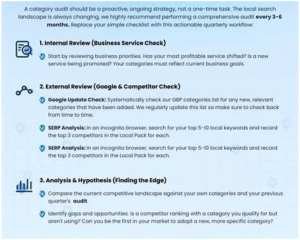
(1) Business services → (2) Keyword research → (3) Competitor category check → (4) Choose primary + secondaries → (5) Website alignment → (6) Monitor & iterate.
- Measuring Results: Metrics & KPIs
To know if your category strategy is working (and therefore driving more traffic), you’ll want to measure and track certain metrics.
Key Metrics to Track
- Discovery Searches in GBP insights: how many times your profile appeared via a search (vs direct).
- Queries Used to Find Your Business: what search terms customers used. If you see more high‐intent terms aligning with your category strategy, that’s a win.
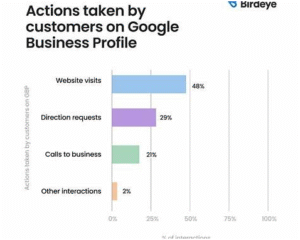
- Clicks to Website: traffic coming from your GBP to your site. Segmented by service pages if possible.
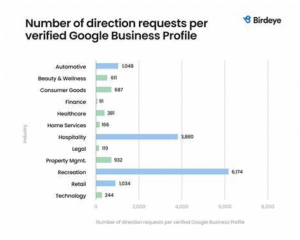
- Calls / Direction Requests: user actions from the listing. Higher-intent users usually convert.
- Conversion Rate: of traffic from GBP → leads → customers (if you have tracking).
- Ranking in Local Pack / Maps: For target keywords, is your profile moving up in position?
- Review count & keyword inclusion: Do reviews mention the categories/services you added? This reinforces relevancy.
How to interpret results
- If you change the primary category and you see an increase in discovery searches / relevant queries → positive signal.
- If secondary categories generate new queries (that weren’t visible before) → your breadth tactic is working.
- If you have many impressions but very few clicks or calls, maybe your category is too generic or misaligned.
- If you don’t see any change after 3-4 months, revisit your category selection, website alignment, and competitor landscape.
Benchmarking & realistic expectations
- Gains usually start modest: small increases in “discovery” and “clicks” then accumulate.
- Major changes (like changing primary category) may temporarily affect ranking while Google re-indexes your profile — allow a 4-8 week stabilization period.
- Business listings in very competitive local markets will face more headwind; the category advantage helps but does not override all other ranking factors (reviews, proximity, citations, website).
- For very niche services, the traffic volume may be lower but higher quality (better conversion).
- Summary & Final Recommendations
Here’s a recap of key takeaways and final practical advice:
- Primary category = your business identity. Choose the most specific accurate label you can.
- Secondary categories = your specialties / additional services. Use them wisely to widen your reach, but stay relevant.
- Categories have a direct effect on which searches your GBP listing is shown for, and thus on traffic and leads.
- Align your website content, service pages, reviews and overall profile with the selected categories.
- Avoid broad or mis‐aligned categories, do not overload with irrelevant secondaries, and don’t neglect tracking.
- Use a structured workflow for selection, implementation, tracking and iteration—treat category optimization as an ongoing process rather than a “set-and-forget” item.
- Measure your impact: track discovery searches, clicks, calls, conversions… and revisit quarterly to refine.
- Consider seasonal or strategic changes (especially for service businesses) to capture timely search demand.
By doing category optimization properly, you’re not just tweaking your listing—you’re shifting how Google understands your business, and how potential customers find you. That clarity leads to more of the right traffic, which means more leads, more customers, and better ROI from your local search efforts.
- Bonus: Category Audit Template
Here’s a quick template you can copy and use for your own GBP profile audit:
| Audit Item | Status | Notes / Actions |
| Primary category clearly reflects core business? | ✅/❌ | Change if needed |
| Secondary categories selected (2-5) and relevant? | ✅/❌ | Add/remove as appropriate |
| Website homepage & service pages aligned with categories? | ✅/❌ | Update content if needed |
| Reviews mention the key services/categories? | ✅/❌ | Encourage targeted reviews |
| GBP Insights show increase in discovery / relevant queries? | ✅/❌ | Monitor change after adjustment |
| Tracking in place (Clicks, Calls, Conversions) from GBP? | ✅/❌ | Setup or refine tracking |
| Quarterly review schedule established? | ✅/❌ | Set calendar reminder |