






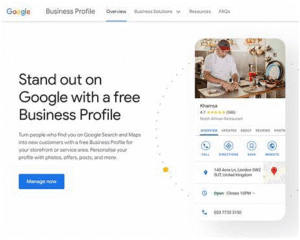
When it comes to local SEO and visibility on Google Business Profile (formerly Google My Business), one of the most under-appreciated levers is your category settings. Choosing the right “Primary” and “Secondary” categories isn’t just a check-the-box exercise — it has lasting consequences for whether your business shows up in Maps, Search, Local Pack, and how highly you rank. As multiple guides point out:
- Categories are “labels that match your business type … they decide when you appear in local results and what features unlock.”
- Your primary category is among the top ranking-factors for local SEO; selecting a mis-matched category may mean you never appear for the queries you want.
- There are thousands of possible categories, and the list keeps evolving—so you can’t afford to pick something “close enough” and leave it.
In this detailed blog article, we’ll walk you through the 7 costly mistakes businesses commonly make when choosing their Google Business Profile categories — each mistake will include clear explanation, real-world examples, visual flows or charts you can replicate, and actionable tips to prevent or fix them. By the end, you’ll not only know what to avoid, but also how to choose the ideal categories for your business and maintain them over time.
Table of Contents
- Why Categories Matter (and how the system works)
- Mistake #1 – Selecting a Too Generic or Broad Primary Category
- Mistake #2 – Ignoring Secondary Categories or Using Irrelevant Ones
- Mistake #3 – Matching a Category That Doesn’t Reflect What You Do (vs. what you Have)
- Mistake #4 – Copying Competitors Without Vetting Their Fit or Performance
- Mistake #5 – Not Updating Categories When Your Business Model Changes
- Mistake #6 – Over-Using Category Slots (Adding Every Possible Service)
- Mistake #7 – Failing to Monitor Effects & Audit the Changes
- A Step-by-Step Framework to Choose Your Ideal Categories
- Case Study: Two Businesses (Before & After)
- Summary and Next-Steps Checklist
- Why Categories Matter (and How the System Works)
Before diving into mistakes, it’s crucial to understand why categories matter and how they work in the context of your Google Business Profile.
What are the categories?
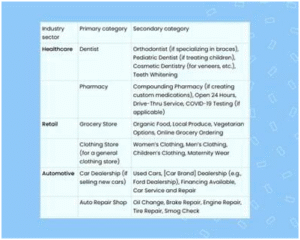
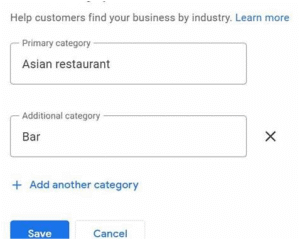
When you set up or edit your profile, Google asks you to pick one Primary Category and then allows up to nine Secondary Categories (so up to 10 total). These are drawn from a predefined list (i.e., you cannot write a custom category). For example, you may pick “Dentist” as your primary, then “Cosmetic Dentist,” “Emergency Dental Service,” as secondaries.
How do they affect your ranking & visibility?
- Relevance: The category tells Google what your business is. The system uses this to decide if your business should show for a given search query or local result.
- Features & display: Depending on your category you unlock certain profile features (booking buttons, menu links, etc).
- Keywords & competition: The primary category heavily influences the keywords you will (or will not) rank for. A mis-chosen category may mean you’re competing in the wrong niche.
How many categories should you pick?
You can pick 1 primary + up to 9 secondary (i.e., up to 10 total). However, more isn’t always better. Many experts recommend choosing only those categories that genuinely reflect your core business.
The big takeaway
Your category selection is not just administrative—it is a foundational local-SEO decision. If you pick poorly, you may be invisible for key searches even if everything else is optimized.
- Mistake #1 – Selecting a Too Generic or Broad Primary Category
What this mistake looks like
A business picks a generic category such as “Consultant,” “Service Provider,” or “Business Center” when their actual function is much more specific (e.g., “Digital Marketing Consultant,” “SEO Agency,” “Coworking Space”). The category is so broad that it fails to capture intent, specificity, or niche.
Why this causes problems
- You make it difficult for Google to understand what you really do. The primary category signals your identity, as opposed to a possible service you happen to provide.
- You compete broadly with many businesses that fit the generic label — making it hard to rank highly for the queries you want.
- Google may not show you in the “niche” searches that bring high-intent customers (because your label is too generic). Example: If you’re a “Pediatric Dentist” but you choose “Dentist,” you’ll compete against general dentists and may miss kids-clinic-specific searches.
Real-world example
Imagine a home-service business that does both plumbing and heating. They might choose “Plumber” as the primary category, but suppose that 80 % of their work is “Radiant Floor Heating Installation.” A better primary category might be “Radiant Floor Heating Contractor” (if available) or “Heating Contractor.” Choosing “Plumber” might bury them in general plumbing searches and make them invisible for their key niche.
How to fix / avoid it
- Step 1: Think about your business in a sentence: “My business is a ___.” The blank should be your primary category. Then ask: does the category reflect your core offering, not a peripheral one?
- Step 2: Use competitor research: check the top-ranked businesses in your area for your main service and see what categories they’ve chosen.
- Step 3: Aim for the most specific accurate category that still describes the bulk of your business. Over-specific can be bad (if there’s no matching category) but avoid defaulting to broad.
- Step 4: After choosing, monitor the search visibility and queries your profile gets: if you’re receiving irrelevant views or low-intent traffic, revisit.
Visual flow
Define core service → Research matching category → Choose specific but accurate primary → Monitor and adjust
- Mistake #2 – Ignoring Secondary Categories or Using Irrelevant Ones
What this mistake looks like
- You only select a primary category and leave all secondary slots blank.
- Or you fill secondary categories with services you can offer but rarely do (or don’t have evidence of).
- You add irrelevant or loosely-related categories that don’t reflect what the business actually does (e.g., a bookstore adds “Coffee Shop” category because they sell coffee but it’s not a core service).
Why this causes problems
- Secondary categories help you capture additional keyword search contexts and long-tail queries. If you ignore them, you limit your reach.
- Using irrelevant or marginal categories can confuse Google’s algorithm about what you do, diluting your relevance and possibly reducing trust.
- They also expand the “features” and filters your business appears under; skipping them means missed opportunities for visibility.
Example scenario
A bakery that also does custom wedding cakes could choose:
- Primary: “Bakery”
- Secondary: “Wedding Cake Supplier,” “Custom Cake Shop,” and maybe “Caterer.”
If the bakery only uses the primary category and ignores the secondary, they may not show up when someone searches “custom wedding cake Detroit” — the search intent is there, but the category signal is missing.
How to fix / avoid it
- Step 1: List your secondary services (i.e., what you do in addition to your main focus).
- Step 2: For each service, check if a valid category exists in the drop-down when editing your profile.
- Step 3: Choose only those categories that meaningfully reflect services you regularly provide and can support (with website pages, reviews, etc.).
- Step 4: Periodically audit the secondary categories: remove ones you no longer offer, add new ones when you expand your services.
Pro tip
Don’t just add as many as you can. Use secondary categories strategically — each secondary should be backed up by actual business data (service page, review, photo) that authenticates it.
- Mistake #3 – Matching a Category That Doesn’t Reflect What You Do (vs. What You Have)
What this mistake looks like
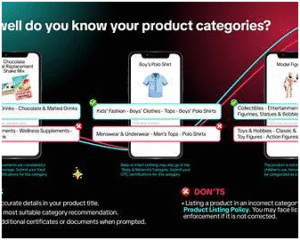
You select a category based on a prominent feature of your business (what you have) rather than what you are. For example:
- A motel with a spa may choose “Spa Resort” because they have a spa, but their primary function is accommodation.
- A general department store sells electronics and furniture — you pick “Electronics Store” because that section is big, but you essentially are a “Department Store.”
Why this causes problems
- Google explicitly states the category should reflect what your business is, not a subset of what it has. This is the difference between identity vs. accessories. Choosing the wrong angle mis-signals your business.
- If your category mis-represents you, you’ll attract irrelevant queries and lose visibility for the ones you should be ranked for.
- You may unlock the wrong features or mislead searchers (which can impact click-throughs, trust, and ultimately conversions).
Example scenario
A gym that also offers physical therapy services might choose “Physical Therapist.” But if the majority of their business is gym memberships, personal training, group fitness, then the correct primary category may be “Gym,” and “Physical Therapist” would be a secondary (if you legitimately offer that service). Mis-capturing the business identity can mis-direct Google’s mapping of your service and how you appear in search results.
How to fix / avoid it
- Step 1: Ask internally and objectively: what is the top-line function of the business? What is the majority of what you do?
- Step 2: Choose a category that states: “This business is a ___” (not “offers ___” or “has ___”). Those who sell cars are car dealers; they don’t call themselves “car showroom.”
- Step 3: Use your website, reviews, main service pages, to support that category choice.
- Step 4: Use secondary categories to capture additional offerings or features (i.e., “This business also does ___”), rather than making them the primary.
| Business | What the business is | What the business has |
| Bookstore with café | Bookstore | Café inside |
| Hotel with restaurant & spa | Hotel / Lodging | Restaurant & Spa amenities |
| Auto detailing shop with minor repair | Car Detailing Service | Auto Repair Shop inside |
Selecting the first column category aligns with what your business is and will serve you better for category selection.
- Mistake #4 – Copying Competitors Without Vetting Their Fit or Performance
What this mistake looks like
You glance at your competitor’s listing, see a category they’ve chosen, and assume “if they chose it, it must be right.” So you mirror that category without analyzing whether your business model, focus, or target keyword set is the same.
Why this causes problems
- Even if a competitor ranks well, their business model, geographic area, resources, reviews, and domain authority may differ. Simply copying their category may not yield the same results for you.
- You might end up picking a category that only works for them because of unique circumstances (brand strength, high review volume, niche advantage) but not for you.
- Worse: If you select a category that doesn’t align with your website, reviews, or actual services, you risk confusing Google (and your audience), which can degrade your ranking.
How to fix / avoid it
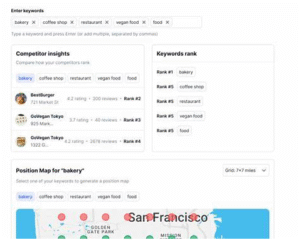
- Step 1: Identify 3-5 strong competitors who rank on Page 1 or in Local Pack for your target service + area.
- Step 2: Inspect each competitor’s Google Business Profile: note their primary category, secondary categories, service pages, review volume and keywords they’re targeting.
- Step 3: Compare their business model to yours: Are their services the same? Do they serve the exact same geographic area? Do they have the same reviews/age of business?
- Step 4: Make an informed category decision: you may adapt their category, but you must ensure it aligns with your business, your website content, your review profile, your keyword ambitions.
- Step 5: After you pick your category, track traffic and ranking movement. If you don’t see improvements (or see declines), consider revisiting.
Pro tip
Use tools (or browser extensions) that allow you to view all categories of competitor profiles (some only display the primary category). That gives you fuller insight.
- Mistake #5 – Not Updating Categories When Your Business Model Changes
What this mistake looks like
Your business has evolved (new service, focus shift, rebranding, expanded geography), but you leave the categories unchanged. Or you keep them the same for years without reviewing.
Why this causes problems
- If the category doesn’t reflect what you currently deliver, you become less relevant for current search queries and trending services.
- Google’s algorithm and categories evolve; new categories may emerge that better match your offering. Failing to adopt them means missed opportunity. GMB Everywhere+1
- In worst cases: outdated categories may mis-lead customers or trigger penalties for mis-representation.
Example scenario
A physical retail store expanded to include e-commerce and local delivery. They originally selected “Retail Clothing Store.” With the shift, a better primary might be “Online Clothing Retailer” (if available) or keeping the physical store while adding secondaries like “E-commerce clothing store,” “Local Delivery Service.” They ignored the change and their visibility in “buy online near me” queries faltered.
How to fix / avoid it
- Quarterly audit: Every 3 months, review your business offering and ask: Have we added/removed major services? Have we changed our focus?
- Category check: While auditing, check if Google added a new category that better fits you.
- Website alignment: Ensure your website content (service pages, homepage, FAQs) reflects the services associated with your chosen categories.
- Change carefully: Changing the primary category may cause a slight ranking shift or re-verification; plan the change and monitor the impact.
Visual checklist
- Business model changed (new services, product lines)
- Website content updated to reflect change
- Google Business Profile categories reviewed
- Primary category still matches core business?
- Secondary categories updated accordingly
- Mistake #6 – Over-Using Category Slots (Adding Every Possible Service)
What this mistake looks like
You load your profile with as many categories as you can, even if some aren’t central to your business. The logic: “More categories = broader visibility.” So you pick everything from “Plumber” to “Landscaping Contractor,” “Gutter Cleaning,” “Snow Removal” — even though your main business is just “Plumbing.”
Why this causes problems
- Google’s guideline suggests using the fewest number of categories needed to describe your overall core business. Over-categorizing can dilute the signal and confuse Google about what your business is.
- You may inadvertently trigger a penalty or lost trust in ranking because your listing appears less focused (especially if the website and reviews don’t show equal coverage for all services).
- You spread your marketing thin; instead of ranking strongly in one niche, you rank weakly across many unrelated ones.
Example scenario
A landscaping company also offers snow removal in winter. They fill categories: “Landscaper,” “Snow Removal Service,” “Lawn Care Service,” “Tree Service,” “Garden Centre,” “Irrigation System Supplier.” But their website and reviews are mostly about “Lawn Care” and “Landscape Design.” Because the category list is overloaded, Google may not know what to prioritize, and may rank them lower for their real focus.
How to fix / avoid it
- Step 1: Identify your top 2-3 services that generate most revenue or focus (and match your long-term strategy).
- Step 2: Choose the primary category for your main business function.
- Step 3: Use 1-4 additional categories max (unless you genuinely offer many equally important services).
- Step 4: Make sure each category added has supporting evidence: a dedicated website page, reviews/testimonials, and photos. If not, drop it.
- Step 5: Less can be more: focusing on fewer, well-supported categories will yield better visibility for high-intent queries.
- Mistake #7 – Failing to Monitor Effects & Audit the Changes
What this mistake looks like
You set your categories, then never revisit for months or years. You don’t monitor whether the category changes you made improved visibility, or whether new search patterns require updating. You also ignore the insights data in your Google Business Profile dashboard or local SEO tools.
Why this causes problems
- Local search dynamics and customer behavior change: new keywords, new service demands, newer competitors. Without auditing, you may miss shifts that hurt your ranking.
- You can’t tell whether a category change helped, hindered, or did nothing. Lack of measurement = guesswork.
- Because your profile is “set and forget,” you risk falling behind competitors who are proactively refining their categories and tactics.
How to fix / avoid it
- Monthly or quarterly check-in: Review your GBP (Google Business Profile) Insights dashboard: look at queries, how customers found you, what category labels appear, and whether your overall views/clicks changed.
- Ranking tracking: For your key service + location keyword, check whether your listing shows in the Local Pack or under the category you selected.
- Category review when you do other major changes: Website redesign, service expansion/contraction, rebrand — these are triggers to revisit categories.
- Document changes: When you change a category (primary or secondary), record date, what you changed from/to, and monitor the effect for at least 4-6 weeks.
Quick audit flow
- Export insights from GBP (Views, Searches, Customer Actions)
- Note top search queries and compare to your target services
- Check your category labels match intent of top queries
- If mismatch or decline in performance, adjust category and document change
- Re-monitor after 6–8 weeks
- A Step-by-Step Framework to Choose Your Ideal Categories
Here’s a reproducible framework you can follow to ensure you pick the right categories and avoid the 7 mistakes above.
Step 1: Define your core identity
- Write in one sentence: “Our business is a ___.”
- Identify the one service/offer that represents your business most frequently and profitably.
- Confirm it against your website homepage, reviews/testimonials, and service pages.
Step 2: Keyword & competitive research
- Search Google for “ + ” and check which businesses appear in the Local Pack.
- Open their profiles (in Google Maps) and note their primary category (and if you can, their secondary ones).
- Use tools or spreadsheets to capture a list of category labels those top-rankers use.
- Observe which labels seem to correlate with stronger visibility.
Step 3: Choose your primary category
- From your research, select the most specific category that accurately reflects your business (what you are, not what you have).
- Ensure it matches your website, main service pages, reviews.
- Avoid ultra-generic terms if a more specific one exists.
Step 4: Choose your secondary categories
- Make a list of other services you offer that are meaningful.
- For each, check Google’s category list for matching option.
- Add up to 2-4 categories that are clearly supported by your business (website/service pages/reviews).
- Avoid adding every capability you could offer unless you actively market and deliver it.
Step 5: Align your website and profile content
- Make sure your website homepage, service pages and testimonials reference the chosen categories/services/keywords.
- Update your Google Business Profile’s “Services” or “Products” section (if applicable) to reflect those same offerings.
- Ensure NAP (Name, Address, Phone) consistency and profile completeness — categories alone won’t fix other listing errors. Q-Tech
Step 6: Monitor, audit and refine
- After updating categories, monitor your GBP insights and keyword ranking over the next 4-8 weeks.
- Use our check-in flow from Mistake #7.
- If performance improves (more views, clicks, calls for relevant service queries) → keep. If not → revisit category choice or website alignment.
Illustrative Timeline
Week 0: Define core identity & do research
Week 1: Update primary & secondary categories
Weeks 2-8: Monitor insights & rankings
Month 3: Audit & refine if needed
Quarterly: Category check & business/service model alignment
- Case Study: Two Businesses (Before & After)
Let’s look at hypothetical but realistic examples of businesses that made category mistakes — then fixed them using the framework above — to illustrate the process and outcome.
Business A: “City Tech Repairs” – Computer Repair + Managed Services
Before
- Primary category: “Computer Store”
- No secondary categories
- Website emphasized “we repair desktops & laptops” but also offered network setup, managed IT.
Problems - “Computer Store” signalled retail rather than service/repair, so profile showed in searches for “buy computer” rather than “repair computer.”
- Lack of secondary categories meant missing queries like “network support,” “managed IT services.”
Fix
- Research near-ranked competitors in “computer repair Detroit” and observed their categories.
- Choose primary: “Computer Repair Service”
- Add secondaries: “Managed Service Provider,” “Network Installer,” “Laptop Repair Service.”
- Update website: highlight repair and service-terms (not just “computer store”), update service pages.
- Monitor for 6 weeks: saw increase in “repair” queries, more contact calls.
Business B: “GreenLeaf Landscaping & Maintenance”
Before
- Primary category: “Landscaper”
- Secondary categories (added many): “Tree Service,” “Snow Removal Service,” “Garden Centre,” “Irrigation System Supplier”
- Website focused almost entirely on lawn care and hardscape design; tree work and snow removal were occasional.
Problems - Too many secondary categories diluted the signal; Google couldn’t clearly identify the core service.
- Dominant services (lawn/hardscape) were not represented as specifically as possible.
Fix - Re-define core offering: lawn care + design/hardscape.
- Choose primary: “Lawn Care Service”
- Add secondary: “Hardscape Designer,” “Landscaping Company.”
- Remove “Snow Removal Service,” “Garden Centre,” and “Irrigation System Supplier” (because they were small/minor).
- Website updated to match category focus.
- After monitoring: better ranking for “lawn care Detroit,” higher calls & engagement.
- Summary & Next-Steps Checklist
Key Takeaways
- The categories you choose in your Google Business Profile are critical signals for Google’s local ranking algorithm and for actual customer search behaviour.
- Mistakes around choosing categories — being too generic, mis-aligned, overloaded, or ignored altogether — can cost you visibility.
- A strategic and data-driven approach (defining core identity, competitor/keyword research, selecting specific primary + relevant secondaries, aligning website, then monitoring) is far superior to “pick something and forget it.”
- Regular auditing is essential because business models, search behaviour, and the category list itself evolve.
Next-Steps Checklist (Download & Apply)
- Define your business in one sentence: “Our business is a ___.”
- Research 3-5 competitors for your main service + location; note their categories.
- Select your primary category based on specificity and alignment with your core offering.
- Add up to 2-4 secondary categories that genuinely reflect your additional services.
- Match your website content, service pages, reviews, to those categories.
- Update your Google Business Profile with the selected categories; document the change date.
- Monitor GBP Insights and local ranking for your key service/keywords over 4-8 weeks.
- Every quarter: review services offered, check if your categories still align, adjust if needed.
Final Thoughts
Choosing the right categories for your Google Business Profile may appear like a small technical task, but in reality it is one of the highest-leverage elements you have in local search. Done well, it sets a strong foundation for everything else: your website relevance, your reviews, your click-through rates, your customer calls. Done poorly, it can hinder you invisibly, quietly costing leads and revenue.
If you follow the steps above, avoid the seven major mistakes, and treat categories as a strategic asset—not just a form to fill—you’ll be in great shape to dominate your local niche and show up when your ideal customers search for exactly what you do.